Showing posts with label access. Show all posts
Showing posts with label access. Show all posts
Thursday, February 2, 2017
These Secret Codes Let You Access Hidden iPhone Features
These Secret Codes Let You Access Hidden iPhone Features

iPhone is the most popular type of cell phone in the world which has much craze among the people due to its stunning look, incredible features, and design. Despite the fact that millions own an iPhone, many are unaware of some of the most amazing features hidden away in this little device. Did you know that there are actually a handful of secret iPhone codes? Yes, it’s true.
Here are “The secret codes” which most of the iPhone users are not aware of. The features range from extremely useful (like showing your exact signal strength) to very niche (like displaying your call forwarding status). These secret codes are combinations of numbers and the *(asterisk) and # (number sign) symbols.
Check The List of iPhone Secret Codes:
1. Block Caller ID:
By using the simple code you can hide your phone number. No one would be able to identify if it’s you calling. To do this just dial #31# and your phone number.

It will look like this for the person receiving the phone call.

2. Check Signal Strength:
The signal bars are not the correct method to measure whether the signal is good or bad. Dialing *3001#12345#* will bring up a list of options. Ignoring the list of choices, just hold down the power button until the home screen reappears.

You will have numbers on the top left, instead of bars or circles. A number between the range of -4 to -80 indicates a strong signal, below that, is a bad signal. If you are down around -140, you have no signal.

3. Find Your Phone’s Unique IMEI:
We know that every phone as its unique code identifier that is displayed inside the phone settings.

But by typing #06# you can easily access the code.

4. Find Out Where Your Texts Go:
Do you know that regular messages (SMS) work by forwarding your message wirelessly to a message center via a specific phone number? Yes, it’s true. To see your carrier’s secret number, punch in *#5005*7672# and then hit the call button.

5. Call Barring:
Call barring, this allows you to block both incoming and outgoing calls. You will have to pay for the service. But if you already do, enable it by entering *33*PIN#, or you can disable it by entering #33*PIN#.

6. Call Waiting:
This is also a paid service. Call waiting allows you to place incoming or current calls on hold. You can turn it ON or OFF and figure out whether it’s done with a few codes. To find out the status of your call waiting, dial *#43#. To turn it ON, dial *43# and to turn it OFF, dial #43#.

7. Call Forwarding:
To check if your forwarding calls are activated and where you are forwarding them to, enter *#21#.
8. Check Number of Missed Calls:
To check the number of missed calls, punch in, *#61#.
9. EFR Mode:
EFR stands for Enhanced Full Rate that improves voice quality for GSM services. To turn it on, dial *3370#. However, this slightly reduces battery life.

Now, you are aware of the iPhone secret codes right. Will these codes make your life easier? Do let us know in the comment section below.
Available link for download

Friday, January 20, 2017
How To Hack Facebook Account With Facebook Remote Access
How To Hack Facebook Account With Facebook Remote Access
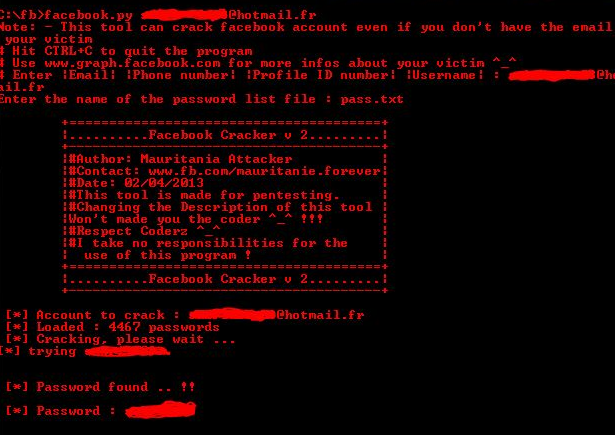
How To Hack Facebook Account With Facebook Remote Access - Hello 3xploi7er, today im going to share a trick that is very rare. Do you know token? token is a tool that is used user authentication. token is used to validate yourself and to a secret key.
On Facebook. This token have access to post an article, photo or link. But this token can be very fatal if other people know your token. Thus the token is very important and confidential. Do not let others know your facebook token .
Straight to.
Material :
Facebook Remote Access
HTC Oauth
Access Token
1. First we have to come here first: HTC Oauth
2. just Click ok, ok, ok ok ok
3. take your token : Access Token (See picture)

4. Copy your token
5. Paste the token on Facebook Remote Access (See picture)
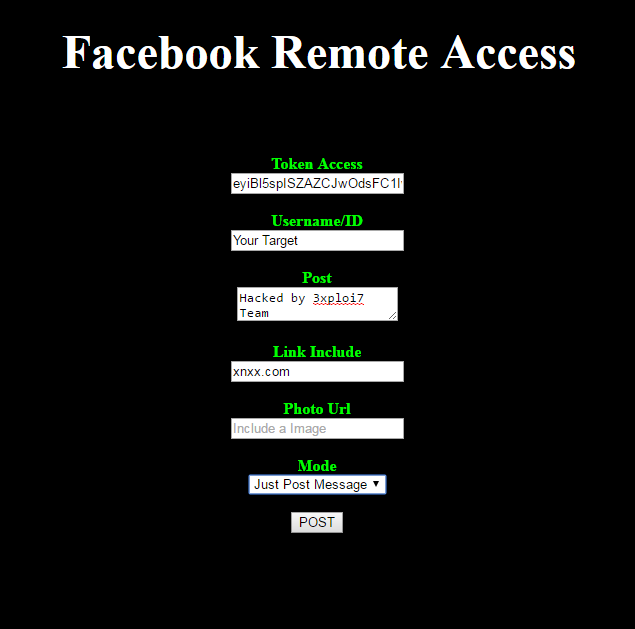
6. enter username, post, photo link url and others.
7. Select Mode, just post a message / Post link / Post Photo.
8. Click Post
If Successful: { "id": "100009498283472_1703984749928118"}

== Indonesia ==
Di facebook. token ini mempunyai akses untuk memposting sebuah artikel, foto ataupun link. Tetapi token ini bisa sangat fatal apabila orang lain tau token kita. Maka dari itu token sangat berperan penting dan bersifat rahasia. Jangan sampai orang lain token facebook kita.
Langsung saja.
Bahan :
Facebook Remote Acces
HTC Oauth
Acces Token
1. Pertama kita harus kesini terlebih dahulu : HTC Oauth
2. Click ok, ok, ok ok ok
3. lalu ke akses token kita : Acces Token ( Lihat Gambar )
4. Copy token kamu
5. Paste token di Facebook Remote Acces ( Lihat Gambar )
6. masukan username, post, link photo url dan lain lain.
7. Pilih Mode, Hanya post pesan / Memposting link / Memposting Foto.
8. Klik Post
Jika Sukses : {"id":"100009498283472_1703984749928118"}
! Refrence
Remote Facebook Access Token Exploit
EDB-ID: 37185
Author: Jeremy Brown
CVE: N/A
Type: webapps
Platform: Hardware
Vulnerable App: N/A
Video Youtube
https://www.youtube.com/watch?v=bVr3BWCkLlI
3xploi7 Team
Available link for download
Subscribe to:
Posts (Atom)