Showing posts with label micromax. Show all posts
Showing posts with label micromax. Show all posts
Friday, February 24, 2017
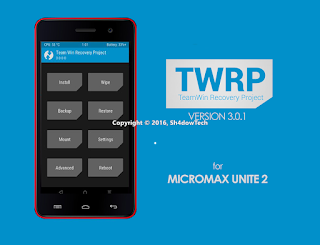
TWRP Custom Recovery for Micromax Unite 2 RECOVERY KITKAT
TWRP Custom Recovery for Micromax Unite 2 RECOVERY KITKAT
WARNING: Rooting your Micromax Smartphone will void its warranty and you won’t be able to claim it. Also, sometimes rooting might get your device bricked. So, if anything wrong occurs to your device while following this tutorial, don’t held me responsible. Proceed at your OWN wish.
Tutorial To Install Custom Recovery Micromax Unite 2 Android Smartphone:
Procedure 1 (USING COMPUTER):
- Download the recovery (obviously ) in pc or move it to pc.
- Start SP Flash tools.
- Load kitkat scatter in it.
- Select only Recovery to flash (tick in front of it)
- Click on download and connect the phone in Switched off state.
- When done, you will see a circle and you will hear a sound too (turn the speaker up )
- Press volume up + volume down + power on. Then press volume up to go to recovery.
- Root your phone, if needed.
Procedure 2 (USING PHONE-ROOT NEEDED):
- Download the recovery in phone or move it to phone.
- Download Flashify (mobile uncle tool should work too, rename the TWRP.img to recovery.img and place it in sdcard root)
- Open flashify and follow the screenshots.
- Reboot to recovery.
Downloads:
- TWRP 2.8.1
- TWRP V3.0.1-0 KITKAT
- TWRP 3.0.2-0 Recovery
Quote:
support new CM 13.0 pattern encryption (sultanqasim)
fix slow flashing issue due to modprobe (present on only some devices) (#twrp)
libtar updated to latest upstream and fixes (jcadduono)
fixes for loading custom themes (_that)
TWRP will now detect and install TWRP themes automatically through the normal zip install process (Dees_Troy)
translation updates - added Italian, Czech and Polish and significant updates to Dutch
progress bar improvements - progress bar updates during image flashing and better tracks progress during file system backups (tar) (Dees_Troy)
fix input box text display (Dees_Troy)
reboot option after zip install complete (bigbiff)
other mostly invisible bug fixes and improvements
fix slow flashing issue due to modprobe (present on only some devices) (#twrp)
libtar updated to latest upstream and fixes (jcadduono)
fixes for loading custom themes (_that)
TWRP will now detect and install TWRP themes automatically through the normal zip install process (Dees_Troy)
translation updates - added Italian, Czech and Polish and significant updates to Dutch
progress bar improvements - progress bar updates during image flashing and better tracks progress during file system backups (tar) (Dees_Troy)
fix input box text display (Dees_Troy)
reboot option after zip install complete (bigbiff)
other mostly invisible bug fixes and improvements
CHANGELOG for 3.0.2-0:
Quote:
Fix a bug with the input box that affected masked inputs (passwords). This fixes decrypt of full device encryption on devices that support decrypt. This bug also impacts encrypted backups. Users are highly encouraged to stop using 3.0.1 if you use encrypted backups or if you need decrypt of data in TWRP.
-Add Greek translation to some builds.
-Add Greek translation to some builds.
Credits:
- Sudeep Bro
- Dees_Troy (Developer Of TWRP)
- EndLess (For Building Recovery And Fixing Invert Touch )
- Charansai (For Helping In Porting Of recovery)
- Ayush Rathore (For Testing & Porting Recovery)
- Pranto (For Material TWRP)
- All Testers For Testing
- techgeek-lab.net - Vijay Jaiswal
Available link for download

Saturday, February 11, 2017
OrionOS v2 6 1 MT6582 For Micromax Unite 2 AOSP OMS SUBSTRATUM
OrionOS v2 6 1 MT6582 For Micromax Unite 2 AOSP OMS SUBSTRATUM

Code:
/*
* Your warranty is now void.
* We are not responsible for bricked devices, dead SD cards,
* thermonuclear war, or you getting fired because the alarm app failed. Please
* do some research if you have any concerns about features included in this ROM
* before flashing it! YOU are choosing to make these modifications, and if
* you point the finger at us for messing up your device, we will laugh at you.
*/

OrionOS is a project based on slim. The name Orion was chosen as a representation of the beauty and vastness of the world around us (Too much Philosophy, eh? :P ). We started this project for Falcon (Moto G), to make a stable Rom, which would include Bitsyko layers and important customization. The Rom is built with Uber toolchain which delivers awesome smoothness and includes a custom kernel built from ground-up to ensure good performance [WIP]. Needless to say, this project is a product of our hobbies and the love we bore for Android.

Features
- Clock settings
- Battery styles
- Battery bar
- Network traffic
- Double tap on statusbar to sleep
- Carrier Label - Custom Headers
- Normal, Modern, PolyHD, Orion
- Weather in status bar
- Quick Pulldown
- Task manager
- Four tile QS toggle
- Force Expanded Notifications
- Immersive message toggle
- Notification count
- Breathing missed call
- Breathing voice mail
- Statusbar Icon toggle Recents:
- Slim Recents
- Clear all recent FAB with six positions
- RAM/memory bar in recents
- Full screen recents
- Show search bar in recents
- Show running apps only
Buttons: - Home, Menu, Recents button rebinding
- Volume key cursor control
- Volume key playback control
- Notification slider [supported devices]
- Volume rocker wake
- Keyboard cursor control
- Swap hardware buttons
Power Menu: - Power Off, Reboot, Screenshot, Airplane Mode, User Switcher, Sound Panel, Bug Report
Lockscreen Tweaks: - Lockscreen wallpaper
- Toggle Lockscreen date, columns ,time
- Toggle Lockscreen media art
- Lockscreen Weather Navigation:
- Navigation bar buttons
- Navigation bar dimensions
- Navbar ime arrows
Gestures: - Ambient Display
- Pocket mode
- Hand Wave
Security: - Advanced Reboot
- CM Lockscreen
- Double tap to sleep on lockscreen
- Quick unlock
- Pin scramble
- Screen pinning
- Disable QS on secured lockscreen
Display: - Advanced Ambient Display
- Dcolumns, switches, dividers, tile view
- LCD density
Sound and Notification: - Volume Steps
- Notification Lights
- Heads up toggle
- Unlink notification and ringtone volume
- Vibrate for calls
- Screenshot sound toggle
- Prevent audio ducking
- Battery Lights
- Disable camera sounds OMS
Misc: - New Icon and logo
- New bootanimation
- Dark theme switch (many improvements on various preinstalled apps)
- Pre-rooted
- Substratum
- Uber 4.9
- Messenger instead of MMS (with NightMode)
- Update gallery (design tweaks)
- OTA (in device info)
- SuperSu in settings -
CM Browser
- Viper4Android
- IME selector notification
- USB debug notify toggle
- SystemUI tuner by default
- Google Keyboard by default
- Orion changelog
Fixed :-
> Camera fc after few clicks fixed
> Inverted video recording issues fixed
> New FM app added and working
> Gps completely fine
> Substratum Working
> Offine Charging Animation fixed
> Totally stable like cm13
> Inverted video recording issues fixed
> New FM app added and working
> Gps completely fine
> Substratum Working
> Offine Charging Animation fixed
> Totally stable like cm13
Thursday, February 9, 2017
CARLIV TOUCH RECOVERY V3 0 For Micromax Unite 2 Lollipop Kitkat
CARLIV TOUCH RECOVERY V3 0 For Micromax Unite 2 Lollipop Kitkat

Prerequisites -
SP Flash Tools -Download
CTR Kitkat Recovery For Micromax A106 -
CTR V3.0 Lollipop Recovery For Micromax A106 - Download
If Any Problem Is Coming Then Download From Here.
You Can Use Another Custom Recovery If Any But For This Tutorial We Will Use CTR Recovery.
Drivers - Download Here,
Steps To Install CTR Recovery Your Unite 2 Using Sp flash Tool: -
For Lollipop User Follow These Method Only- First of All Enable Developer Option By Tapping Settings > About Phone > Build No. 5-7 Times.It Will Enable Developer Options InYour Device.After Enabling Developer Options,
- Go To Developer Options & Tick USB Debugging Option.
- [Note - This Step Is Mandatory, It Will Protect Your Device From Any Type of Damage To Your Device.]
- .Install The Drivers Properly In Your PC/Laptop.
- DownloadMTK_6582_Scatter_File.
- Open SP_Flash_Tools In Your PC/Laptop.
- Select MTK_6582_Scatter..File.
- Now, By Default All The Options Are Ticked/Selected. You Need To Untick All The Options Except Recovery Option.
- Now Click on The Checked Recovery Option > Select CTR Recovery V.3 File From The Directory Where You Saved It.
- Press Download Button.
- Now Remove Bet try From Your Phone And Connect It With PC via USB cable
- Wait For Sometime, A Green Ring Will Appear That Indicates That The Process Is Completed Successfully.
- Now Press Power Button + Volume Up + Down Buttons Together. Then A Type of Black Screen With Some Text Will Appear, Now Press Volume Up Button Twice & Then Volume Down Button Once.Now You Have CTR Recovery on Your Unite 2 A106.
- Enjoy :)
- I Am Not Responsible For Any Damage/Bricking of Your Device. If You Are Not Getting Anything or Stuck Somewhere At Any Step, Drop Down Your Query/Doubts in Comment Box & Ill Help You. :)
Steps To Install CTR Recovery Your Unite 2 Using Terminal: -- Download and put the recovery.img to the root of your sdcard.
- From Phone using Terminal emulator:
- open terminal emulator and type the following commands one by one:
Code:sudd if=/sdcard/recovery.img of=/dev/recoveryFrom PC via ADB:Connect the phone to PC with USB and turn on USB Debugging. Then enter the following command via adb:Code:adb shellsudd if=/sdcard/recovery.img of=/dev/recoverySteps To Install CTR Recovery Your Unite 2 Via Mobile : -- ROOT Required
- Open MobileUncle Tools
- And go to the Recovery Update.
- You should see the recovery you placed in your SD card.
- Select it and click on OK. Finally,
- choose reboot to Recovery.
- If all was done correctly,
- your phone should boot into your new recovery
Congratulations! You now have Installed CTR custom recovery on your Micromax Unite 2 device. You can now enjoy apps that requires Superuser rights, mods and ROMs that requires flashing from CWM.
Thanks A Lot To My Very Dear Friend Patraanjan23 For Developing CTR V3 Recovery For Unite 2and Viajy Jaiswal
Available link for download
Friday, February 3, 2017
REMIX UI Lollipop Custom ROM For Micromax Unite 2
REMIX UI Lollipop Custom ROM For Micromax Unite 2

REMIX Ui is Themed ROM for micromax unite 2 , its Android version is 5.0.2 . He had tried to theme it little bit like Touchwiz and Material colour hope we will like combination that’s why name is REMIX Ui
Also Read: HOW TO INSTALL TWRP IN UNITE 2
ROM Features:
- Based on 5.0.2 Lollipop
- Shared app storage for apps and data
- Setting and Notification panel themed like Touchwiz
- 8MP camera app
- SD card is default storage
- Move to SD supported
- Walkman is Default Music player
- 3Minit Battery MOD added
- Cool Fonts Added
- New boot logo and Animation added
- Pre Rooted with Super SU
- Xposed Pre added in Firmware
- Action Launcher for Marshmallow app drawer
- New icon added for system apps
- Lite in size
Installation iinstructions
- You must have CTR, Twrp Or Philz custom recovery.
- Use CTR Recovery.
- First take a full backup in case you want to restore your old ROM
- Reboot to Recovery
- wipe menu-> fomate system, wipe data option
- Install ROM zip from sd card
- Reboot
Screenshots:

Downloads:
REMIX UI CUSTOM ROM: Download
Themes For Remix UI ROM- Dark Red Theme:- Here.
- Default Theme :- Here.
- MIOS theme :- Here.
- Blue Theme:- Here.
- Dark Theme:- Here.
- Remix RED :- Here.
- Material Dark Theme:- Here.
- Transparent Ui MOD :- Here.
- flux theme :- Here.
- Stock Theme :- Here.
- JB mod theme:- Here.
- Liv Ui Theme :- Here.
- Dark pop :- Here.
- Liv Ui Dark theme:- Here.
- Exception Os theme:- Here.
- MiUi theme:- Here.
Credits:-
- Bachittar Sandhu
- Sai Charan ( for made 2 themes )
- Techgeek-lab.net -Vijay Jaiswal
Available link for download
Sunday, January 29, 2017
CM 12 1 FINAL V4 For Micromax Unite 2
CM 12 1 FINAL V4 For Micromax Unite 2

CM 12.1 FINAL V4 For Micromax Unite 2
CHANGELOG :
-------------------------
CHANGELOG of version v1
STABLE CM12.1 20160925
------------------------
Added Gapps
Added Smart Wake , with app Integration in settings
Added Smart Cover , with app Integration in settings
Added Adaway , with app Integration in settings
Added Network Traffic , with app Integration in settings
Added (Viber4) app Integration in settings
Added SuperSU Integration in settings.
Added Kernel Auditor Integration in settings.
Added Camera Next
Added Gallery Next * PATCHED
Added Root Explorer
Added JetAudio Plus
Added New Eleven Music Player
Added Sony Keyboard
Added ADM Pro (Default Downloader App)
Added MLUSBMounter
Added NEW Calendar & Email BY BOXER
Added TrueCaller MOD will now integrate directly into CMs Dialer
Added Cyanogen Account, ThemeStore, ThemeChooser with per-app themeing
Added GLtools for Gamers
Added XinternalSD
Activated ClearMotion, BRAVIA v4 and X-Reality Engine v4,
spelled trouble-free codecs to view FullHD streaming video
braries
Remove adaway,superSU,viber and some apps from app drawer, them, already in settings.
Fixed Youtube 720p
Fixed Green Lines In Facebook
Fixed VPN
Fixed App2SD
-------------------------
CHANGELOG of version v2
STABLE CM12.1 20161015
------------------------
Fixed Screen Record
Added Screenshot Bottom On Status Bar ( Long press for countdown screenshot)
Added List Scroll Animations
Added System Animations
Added Toast Animations
Added OmniSwitch
Added Task Manager bottom on status bar
Added Font Chooser
Added System App Remover
Added Night Mode
Added Trebuchet 6.0.1
Added HK PROJECT (HKXInstaller) {Various tweaks for Package Installer}
Transferred All Addiations to Rom Control EXCEPT Kernel Auditor + SuperSU
Remove Checking Signature Applications Completely
Patched Whole Status Bar AS android N
Fixed Front Camera Record
Patched No Recents Apps * AS Android N
rounded corners Recents Apps
-------------------------
CHANGELOG of version v3
STABLE CM12.1 20161027
-------------------------
Added Customize Settings Panel
Added Preference Control
Added Settings Titels
Added Autostart Apps
Added Flash alerts settings
Added Recents Panel
Added Gesture Anywhere
Added Edge Screen By Samsung
Added Header Machine
Added Header Auto Machine
Added Extra Info Display In About phone
Added CPU + Ram In About phone
Added Weather Lock Screen
Signature Verification Fully Working 100%
All Apps Updated
Themed More AS Android N
-------------------------
CHANGELOG of version v4 & Last
STABLE CM12.1 20161125
-------------------------
Added cache auto cleaner
Added SD Card Speed
Added Another Task Manager
Added Dynamic Ststus Bar (DSB)
Added App Circle Sidebar
Added Shake Mode
Added Ambient Display
Added freeze apps Manager
Added wifikill Manager
Added Buildpropeditor
Added APK Backup-Share
Added appBatchUninstaller
Added Data Wifi Protection
Added Font Chooser update to (nonapk)
Remapped Whole Rom
Removed the old gapps that included in firmware
Restyle way settings of rom
Removed Xposed Package {Only App included in rom}
( u can try the any package working fine with U )
Quote:
FAQ :
[Q] Cant Click Install Button While Installing an APK ?
[Ans.] It happens if you are using some screen adjusting app like Night Mode
{SOULTION} Go To Setting -> Apps -> All Apps -> Look for Night Mode App And Make Force Stop Or Disable Until u Finish Inastillng the APK File.
DONT FORGET TO SETUP YOUR INTERNET SECURITY
[Q] Apps are not installing
[Ans] Flash Xposed Zip after booting ROM .. after that all apps will install successfully
[Q] Internal not Showing ?
[Ans] Fix Given just flash it with recovery without any wipe .. fix with camera megapixel flipped (note: After Flashing Internal fix youll get partitioned storage )
[Q] Network Problem?
[Ans] : Flash the NetworkFIX patch
DOWNLOADS
DOWNLOAD : CM 12.1 v4
Dev-Host link : CM 12.1 v4
Mediafire link : CM 12.1 v4
Xposed : Xposed for CM (flash it after booting ROM for first time)
Mediafire link : CM 12.1 v4
Xposed : Xposed for CM (flash it after booting ROM for first time)
Gapps : Gapps for CM( ARM>5.1>pico)
Gapss (Google Drive) : Gapps (GDrive)
InternalSDfix (with camera fix) :- InternalSDfix
NetworkFIX : NetworkFIX
ScreenShots :


CREDITS:
- Ahmed Nasser HK (Modder-Themer)
- Arbaz Khan (Unite 2 Porter)
- Aboothair ( Porter )
- Team HRP
- Tirth Patel (build From source)
- Fire855
- Ferhung
- Al3XCOol
ScreenShots :
Available link for download
Subscribe to:
Posts (Atom)